 A Golden Rule Company
What Recruiters Actually See When You Apply on LinkedIn (+ the 3 Spots That Make or Break Your Application)
Last Updated on January 3, 2026 by Jessica Hernandez
I’m about to share something that might completely change how you apply to jobs on LinkedIn. As someone who’s posted jobs on LinkedIn and hired through the platform, I’ve seen what recruiters actually receive when candidates apply—and you’re going to want to sit down for this.
It’s so different from what most job seekers expect that when I show people, their first reaction is usually, ‘Wait, what?’ Buckle up, because this behind-the-scenes look will explain why your applications aren’t getting responses and exactly what you need to change so they do.
What Do Recruiters See When You Apply on LinkedIn?
The Candidate Profile Card (What Recruiters See First)
First, what the heck is a candidate profile card? It’s a snapshot of you, your background, and your activity on LinkedIn. It highlights need-to-know information for recruiters at a glance so they can decide quickly whether to give your application a more thorough review.
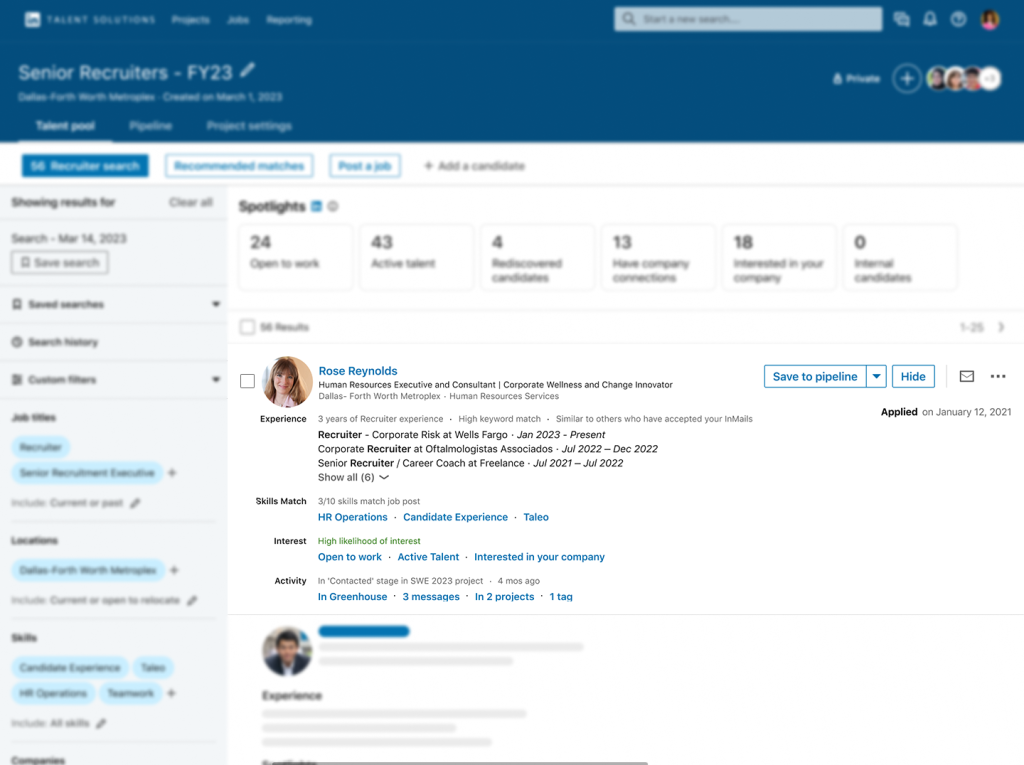
Your candidate profile card includes information like:
Experience – A summary of your experience. Including job titles that LinkedIn pulls from the resumes that you’ve uploaded and made accessible to recruiters.
Recruiters can see your years of experience and a brief list of job titles and employment dates. This gives them a quick overview of your career history.
Skills Match – Relevant skills listed on your profile and uploaded resume that match the job post.
Recruiters can click the skill or hover, and LinkedIn tells them either which job the skill is linked to or how long the skill has been on your profile.
Interesting insight for recruiters, and crucial data for you to optimize.
Interest – “Likelihood of interest” helps recruiters determine which candidates are most likely to respond to their outreach. It highlights key signals from your job search activities, InMail activities, and company info to let recruiters know whether you’re moderately likely or highly likely to respond if they reach out.
It also includes something most job seekers don’t know about – candidate spotlights (my favorite LinkedIn job search secret weapon).
What Recruiters See on LinkedIn: Candidate Insights or Spotlights (Your Secret Weapons for Standing Out)
Another feature of candidate profile cards is that they give recruiters key insights or spotlights about you as a candidate.
These spotlights are vital for you as a job seeker because they set you apart from other candidates with similar job titles or experience.
Spotlights include things like:
Open to work – This indicates to recruiters you have the “open to work” feature turned on. Letting them know you’re interested in hearing about opportunities or actively job searching.
Active talent / engaged in the job market – This is one of my favorite spotlights because it shows recruiters you’re active on LinkedIn and more likely to respond if they reach out. To get this signal on your application, you need to have:
- recently updated your profile
- turned on the “share resume with recruiters” feature
- and be active on LinkedIn.
These are the factors you can control with this spotlight. Those you cannot control, but that also factor into this spotlight, are being in your current role longer than the average tenure of similar roles at your company, or working at a company with recent layoffs.
These are signals LinkedIn’s algorithm identifies as meaning you’re more likely to want to make a career move.
Want to know the other profile optimization secrets that make recruiters come to YOU instead of you chasing them? I break down exactly how to increase your profile views by 1000% and attract quality recruiters in this free 18-minute video training.→ It’s the difference between applying to hundreds of jobs and having interviews lined up for you.
Company connections – This is another favorite; it shows recruiters how many 1st-degree connections you have with employees at the company.
It’s almost like a referral, which is a golden ticket to an interview. Even better if you can get one of these connections to pass along your name to the recruiter.
This also shows why it’s important to have connections inside your target company on LinkedIn. Another way to set yourself apart from other candidates.
Interested in the company – Another interesting spotlight you can control. Any time you interact with the company by selecting “I’m interested” on their about page, liking, sharing, or commenting on any of the company’s page posts or ads – it signals that you’re interested in the company and therefore more likely to respond if the recruiter reaches out.
The Top Choice Badge – I left this one for last because it’s a premium feature and not everyone has access to LinkedIn Premium. If you do have a LinkedIn Premium subscription, then you can choose up to 3 jobs a month as your “Top Choice” (← click the link to watch how to add this to your applications), and it adds a badge to your candidate profile card.

This alerts recruiters that you marked the job as a top choice, and they can read the message you included stating why this job is a top choice.
Pretty cool feature, right?
Keep your message short, sweet, and specific. Why this job? Where is there a values alignment, culture alignment, or specific interest for you? Mention it in your note.
- Pro tip: These spotlights stack on top of each other for maximum impact.
What’s pretty cool here is that you can take simple actions to combine your efforts and create multiple spotlights.
When you are active on LinkedIn, commenting on Company Page posts, you signal interest in that company, which turns on the interested in company spotlight and the engaged in the job market spotlight.
When you turn on the feature to “share resume with all recruiters,” you’re signaling that you’re engaged in the job market, making your resume searchable so the info populates in the candidate profile card, and it triggers the “interest” rating section of the profile card, increasing how your interest in the role is evaluated.
What if recruiters were actively searching for YOU instead? In my free 18-minute LinkedIn profile optimization masterclass,→ I show you exactly how to flip the script and become the candidate recruiters are hunting for.
What Information Recruiters Can See on LinkedIn + (Why This Changes Everything for Your Job Search)
So you may be asking yourself, “Why does any of this matter?” All of these features combine to signal your interest in the role to recruiters and make your application stand out from other candidates.
If I’m hiring for a role and I’m looking at a candidate’s profile card, and they:
- possess relevant prior experience
- have 10/10 skills relevant to the role (heck, 5/10 is actually pretty good because most applicants don’t even have 5)
- have 1st-degree connections within the company
- are actively engaged in the job market
- are interested in my Company
- and marked this particular job as Top Choice
This person is EXACTLY who I want to consider. I’m going to mark them as a good fit and add them to my pipeline to contact. They’re going to stand out head and shoulders above any other candidate – even if hundreds or thousands applied to the role.
See, recruiters can filter the applications they’ve received by relevance. They can filter by skills, years of experience, past positions, and yes, even the spotlights I mentioned.
If you want your applications to stand out to recruiters so you get more responses, then you need to be strategically hitting most of the signals above.
Why Would A Recruiter Look At Your LinkedIn Profile?
Recruiters use LinkedIn to find out more about you after you’ve applied. And they also use it as one large candidate database. In fact, this year fewer recruiters (65% based on some estimates I’ve seen) have been posting openings on LinkedIn and have instead chosen to use LinkedIn like a giant candidate database searching for the right person.
If you’re profile isn’t optimized correctly, you’re invisible to recruiters and being missed for great opportunities in the hidden job market.
Before you scroll away (3 Make-or-Break Changes You Can Make Right Now)
I promised you three make-or-break spots on your profile to get you more attention from recruiters, so… while this news is fresh and you’re motivated, here’s what you need to do:
✓ Make sure your job titles align with your target role now. There are instances where the job title you held at a previous company didn’t match the market value job title that most companies use.
In this case, add the market value title – what your position would most commonly be referred to in today’s job market in parentheses next to the actual title you held. This makes sure you’re hitting the right search terms.
✓ Add relevant skills to your profile. Analyze your top 5 target job postings on LinkedIn and identify the top 10-15 skills listed on each posting. Make sure that each of these skills is listed on your profile and attached to a job.
✓ Turn on the “Share resume with all recruiters feature” so that it will signal your interest to recruiters, your resume will be searchable and factor in search result placement, and you’ll hit a couple of those all-important spotlights I talked about earlier. Here’s a walk-through of exactly how to turn that feature on so you know where to find it.→
I know I only promised three, but while we’re here, we might as well go all in (I’m nothing if not an overachiever!)
✓ Head over to your target Company’s LinkedIn page. While you’re there, see if they have the “I’m interested” button on their About page. If they do, go ahead and click it so you can turn on that spotlight.
At the same time, you may as well interact with their posts to earn the checkmark for engaging with the company brand and showing you’re active in the job market.
After you’ve finished that, you can also check their “People” tab to see if there’s anyone who you’re a second-degree connection with that you could invite to connect and turn into a first-degree connection (thereby hitting another spotlight!).
✓ Finally, if you have LinkedIn Premium, go ahead and mark that job as Top Choice when you hit apply. When you’re writing your message to the recruiter about why this job is a top choice for you, make sure you give the recruiter specific reasons tailored to the company. Answer the question, “Why this job or why this company?”
All of these combine to create a beacon of light directing recruiters to your application over any others.
And honestly, who doesn’t want to be the shiny application in a sea of boring ones?
And that’s what we want as job seekers, right? We want recruiters to spend more time looking at your profile over any other candidate’s.
Now that you know how to spotlight your profile, what about how to get even more recruiters to reach out on LinkedIn?
Share this post:




About the author
Jessica Hernandez, President, CEO & Founder of Great Resumes Fast
Hi, I’m Jessica. I started this company back in 2008 after more than a decade directing hiring practices at Fortune 500 companies.
What started as a side hustle (before that was even a word!) helping friends of friends with their resumes has now grown into a company that serves hundreds of happy clients a year. But the personal touch? I’ve kept that.
You might have seen me featured as a resume expert in publications like Forbes, Fast Company, and Fortune. And in 2020, I was honored to be named as a LinkedIn Top Voice of the year!
I’m so glad you’re here, and I can’t wait to help you find your next perfect-fit position!
Improve Your Resume: Download Your Free Executive Resume Template Today
Are you struggling to create an executive resume that will impress employers? Download this free executive resume template and receive a series of 10 emails with expert guidance on how to write resume content that resonates with employers so you get more interviews.
It's everything you need to stand out, make an impression, and accelerate your job search.
Work with Us