 A Golden Rule Company
What Most Job Seekers Still Get Wrong About LinkedIn (Plus, What To Do Instead)
Last Updated on February 12, 2026 by Jessica Hernandez
Did you know that using LinkedIn as a job board (or as a resume placeholder) is likely costing you interviews and job offers? It also restricts your network growth and visibility to recruiters. 99% of job seekers aren’t using LinkedIn’s 50+ tools and features to accelerate their job search. Are you one of them?

After teaching 3600+ job seekers how to better leverage LinkedIn in my courses (plus countless others via LinkedIn Lives, posts, articles, newsletters, and emails), I’ve found that most people have a sense that there’s more they could do to leverage LinkedIn; they just don’t know how or what that looks like.
In this post, you’ll learn why using LinkedIn as a job board or a resume placeholder hinders your job search and discover five powerful features you can take advantage of to double your interview invitations from recruiters, grow your network 4x, and connect with hiring managers.
If you want to discover how to message hiring managers so they’ll actually respond and how to utilize the other 50+ features LinkedIn has to leverage in your job search, I teach all these topics in more depth as part of my LinkedIn Unlocked Course.
Are you using LinkedIn as a resume placeholder?
Karen, a Communications Manager, was using LinkedIn as a resume placeholder. She’d been job searching for about 5 months and received no interest, interviews, or offers.
Manley, a Sr. Technology Program Manager, used LinkedIn more like Facebook or Twitter — to keep up with colleagues. Both Karen and Manley had a sense that there was more they could be doing to make their time on LinkedIn even more effective. They just weren’t sure what that looked like.
Using LinkedIn as a resume placeholder costs you interviews, job offers, and visibility with recruiters. It also leaves the hidden job market untapped and fails to give you the best advantage in your job search. Did you know 7 people are hired on LinkedIn every minute? And that 70% of members report finding their most recent role through a connection?
And that’s not coming solely from job postings.
There are a whole host of roles that are never posted to LinkedIn’s Jobs page, which people are hired for through LinkedIn. LinkedIn users are sought out and contacted by recruiters who use LinkedIn as one large candidate database. There are roles that people share on their LinkedIn feed. Recruiters even post about roles they’re hiring for in their LinkedIn headlines, profiles, groups, and status updates.
Here’s the thing…if you’re not actively engaging on LinkedIn, you’re missing out on scores of opportunities that other active candidates are snatching up.
It’s not just that you’re not seeing them. It’s that recruiters don’t see you. If recruiters don’t see your profile, comments, or posts, you’re losing job interviews and offers. It doesn’t get much worse than that. The opportunities are out there — to the tune of 7 every minute.
Hopefully, I’ve now convinced you that scrolling through LinkedIn and using it as a resume placeholder is costing you big time. Let’s chat about how to fix that, starting with the five features of LinkedIn that will set you up for greater visibility with recruiters so you can start getting interview invitations.
5 features that set you up for job search success on LinkedIn
I used these five hacks to increase my husband’s LinkedIn profile views by 8,500% during his first week job searching on LinkedIn. I teach these five hacks to my LinkedIn Unlocked course students, and the results have been equally amazing. Melissa saw a 1,277% increase in profile views, Jacob a 2,000% increase, and some others increased as much as 12,000%. So, let’s dive in.
Optimize your LinkedIn profile headline
Your LinkedIn profile headline needs more than just your job title. It is one of the first things that recruiters and potential employers see. To make your LinkedIn profile more visible to employers and recruiters, update your headline. My favorite headline formula is:
𝐓𝐀𝐑𝐆𝐄𝐓 𝐉𝐎𝐁 𝐓𝐈𝐓𝐋𝐄 | 𝟑 𝐇𝐈𝐆𝐇-𝐏𝐑𝐈𝐎𝐑𝐈𝐓𝐘 𝐊𝐄𝐘𝐖𝐎𝐑𝐃𝐒 | 𝐏𝐄𝐑𝐒𝐎𝐍𝐀𝐋 𝐁𝐑𝐀𝐍𝐃𝐈𝐍𝐆 𝐒𝐓𝐀𝐓𝐄𝐌𝐄𝐍𝐓
My husband’s headline update landed him an invitation for an interview with a recruiter within 24 hours. When Karen updated her headline using this formula, she saw her profile views triple.
Add at least two positions
LinkedIn reports that many users add job titles and employment dates to their profiles but don’t fill in the work experience details. This hampers your prospects of being contacted by recruiters for interviews and by your network about potential opportunities. Because they either can’t find you or can’t find the information that would tell them whether you’re a fit or not.
Adding accomplishments under each position is important; it makes you 12X more likely to be contacted by a recruiter. It lets people know what you do and how you do it. This not only helps you stand out to recruiters but also improves the optimization of your profile, as LinkedIn parses your skills to alert recruiters on whether you’re qualified for a role. If your work experience doesn’t include relevant skills, you’re missing out on opportunities to be considered for positions.
Add a professional photo
Adding a professional photo increases the likelihood of people accepting your connection requests by 9x. Also, LinkedIn states that profiles with photos are 26x more likely to be contacted by a recruiter than those without photos.
Make sure to check your privacy settings to see whether your profile photo is set up so that
1) all LinkedIn members can see it
2) no one can
3) only your connections can, or
4) only your network can
If you want to increase the likelihood that recruiters will see it, set it to All LinkedIn Members. You can always go back and adjust it after your job search if you prefer more privacy.
Use skills to increase your profile views by 1,000% or more
This is my absolute favorite LinkedIn hack. This is the one that increased my husband’s profile views 8,500% and skyrocketed every LinkedIn Unlocked student’s profile views by at least 1,000%. Needless to say, it’s incredibly potent, and I recommend stopping what you’re doing to go try this — right now.
You want to gather 3-5 job descriptions for your target role from several of your target companies. You can pull these from LinkedIn, the company website, or another job board. I recommend making sure at least a couple are from LinkedIn.
Next, copy and paste the job description into an AI chat like Claude, ChatGPT or Gemini. Your favorite one will do. Then, prompt it to pull only the professional, academic and technical hard skills from the job description.
You could say, “Give me a list of all the professional, academic, and technical hard skills in each job description. Second, give me a list in order of importance those that are mentioned most across all of the job descriptions.”
Once you have your list of hard skills you want to head back to your profile and make sure that the top 3 most important hard skills (the ones most relevant to the job and mentioned the most) are in your headline, About section, and skills section.
Then, you want to add 5-10 skills per role listed in your profile. Finally, add all remaining skills to your skills section. LinkedIn lets you list up to 100, and you need to use all 100 spaces so you can be found in search results when recruiters run searches.
When it comes to skills, you want to ensure that these hard skills are in your headline, summary, position description, and skills section on your profile.
If you place them in these areas, your profile will be optimized for recruiter searches, and your views will increase. You’ll start having more people reach out to you about openings.
RELATED: Why Hiring Managers Ignore Your LinkedIn Messages (And How to Fix That)
Leveraging LinkedIn’s most powerful feature
The power of LinkedIn is in your engagement and activity on the platform. Read that again.
The power of LinkedIn is in your engagement and activity on the platform.
If you want your network to grow, if you want to be visible to employers, and if you want to attract opportunities to you, then you need to be commenting on posts in your network.
You cannot just scroll. Why? Because scrolling is a passive activity. Commenting is an actively one, and it increases your profile views by 4X – as well as your visibility. I’ve had several students in my course land interviews and job offers from their comments on other’s posts alone. Take 15-30 minutes, three times per week to comment on several posts in your field. You can run a search for a specific keyword then filter by posts.
For instance, if I want to find posts in my field I might search “resume tips” or “LinkedIn job search tips” in the search bar. Then you click the “posts” filter at the top and LinkedIn will show you any posts with those terms. Use the terms for your industry and role.
In this way, you find out what people are saying and you can start adding insights to the conversation. Right now, LinkedIn is heavily favoring authentic conversations. One comment can get 10,000 views. That’s a lot of eyeballs on your comment and clicks over to your profile (not to mention they see your headline in the comment).
You also need to consider posting at least once per week. If you’ve never posted before or don’t post regularly, it will take time to build an audience. However, posting increases your profile views by 4X and if you’re ‘solving in public’, that will happen much faster – as will legitimate recruiter outreach.
Commenting and engaging:
- Increases your network and recruiter visibility, meaning you get more interview invites.
- Expands your connections as you receive more connection requests and followers — which increases your network size and visibility with hiring managers.
- Creates a stronger and healthier network as you build solid, mutually beneficial relationships with your connections so that your network can lead you to positions that are not posted publicly.
If you’re wondering how to be more proactive in your outreach, here are ten opportunities to reach out to your network.
1. Someone viewed your profile. Send them a connection request. LinkedIn will show you if you have mutual connections. This is an open door.
2. Someone sent you an invitation to connect. Message them to say thanks and introduce yourself if you’re not familiar with each other.
3. Your invitation to connect is accepted. Follow up with a personalized message to thank them and introduce yourself.
4. Someone in your network posted about a job change. Congratulate them. Make a note to follow up with them in 30 days to see how it’s going and possibly ask how they made a successful career move.
5. Contact gets promoted. Message them or comment on their post to congratulate them.
6. It’s a contact’s birthday. Send them well wishes.
7. It’s a contact’s work anniversary. Send them well wishes.
8. The contact is mentioned in the news — an awesome way to follow their work.
9. Your connection updated something in their profile — photo, summary, etc. You know who likes to hear that you like their new headshot? Everybody! Just keep it professional. Women do not like to be hit on. “I like your new profile picture, Betty.” is acceptable. “I love your new profile picture, Betty. You look gorgeous — great smile!” is unprofessional, and Betty will likely block you.
10. A contact liked your LinkedIn article. Thank them for their support. I really appreciate it when people take the time to like and comment on my articles and newsletters. It lets me know that the advice and information that I’m providing are valuable to people and that my mission of helping others is succeeding.
Everyone enjoys appreciation and gratitude, even in small, simple gestures. Take the time to show appreciation to someone in your network today.
3 other effective ways to use LinkedIn in your job search
I’m really excited to share these three LinkedIn features with you. All three of them are going to amplify your job search efforts.
Let recruiters know you’re interested
The “I’m interested” feature lets you indicate interest in working with a specific company by heading to their LinkedIn Company Page, going to the About section, and clicking “I’m interested”. Once you click “I’m interested,” your profile and information are privately shared with the recruiters at the company so they can keep you in mind for future opportunities.
Members who share they’re interested in a company are 2X as likely to get a message from a recruiter as those who don’t.
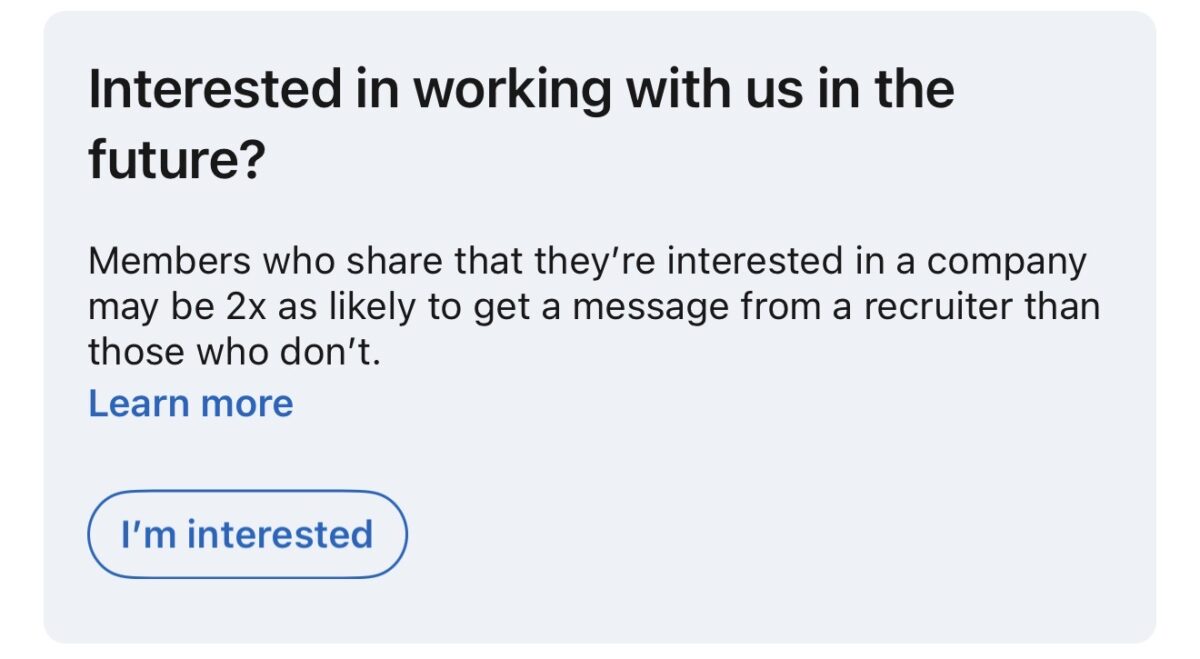
This is one way to get notified about roles before they’re ever posted online for the masses. It also helps recruiters build a pipeline of potential candidates who are likely to respond if they reach out about an opening. You can also find this button on job postings if the company has it enabled. So keep an eye out!
Share your resume with all recruiters
Another great job seeker-friendly feature is “Share your resume with all recruiters.” This feature lets you share the additional information in your saved resumes on LinkedIn with all recruiters.
So, let’s say not everything from your resume is on your LinkedIn profile — which is perfectly normal because your LinkedIn profile isn’t designed to replicate your resume. Any info on the resumes saved to your LinkedIn profile can be shared with recruiters, increasing your chances of getting noticed.
What most job seekers don’t know is that LinkedIn will pull the hard skills listed in your uploaded resume and make them accessible to recruiters searching. This is GREAT for you, because it increases your visibility in search results – especially for those critical skills recruiters are looking for.
I see this feature as another vital way to optimize yourself for visibility and searchability on the platform. You greatly benefit from turning this feature on because it increases your chances of appearing in search results.
It’s easy to access this feature. Go to the Jobs tab, and on the left side, you’ll see Preferences. Click it. The screen below pops up.
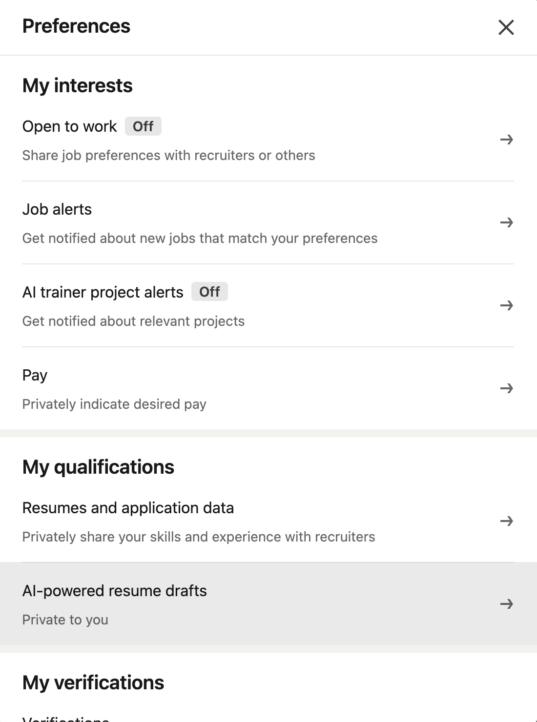
You want to select Resume and application data.
Then, you want to toggle on, Share resume data with hirers
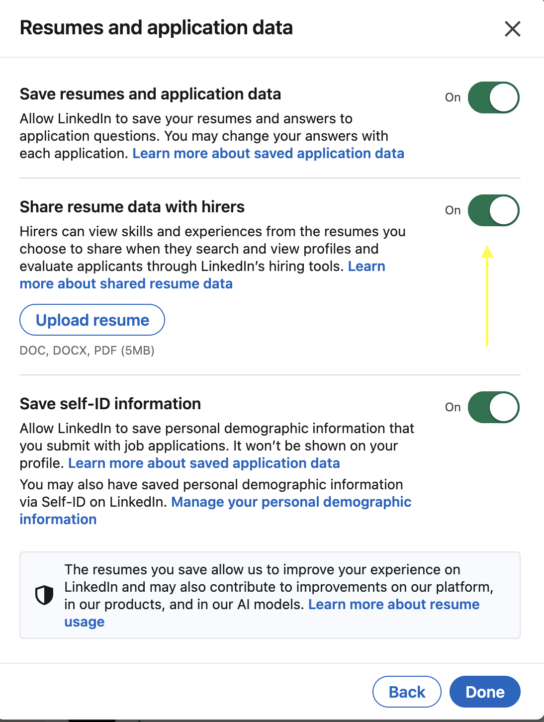
This makes sure that your uploaded resumes are accessible in recruiter searches.
Top Choice Badge
If you’re a LinkedIn Premium subscriber, you get access to a feature call the Top Choice Badge. You’re able to label up to three jobs per month as your Top Choice. Your application gets this neat badge below.

What’s the benefit here? It puts a badge on your application that stands out to recruiters. Plus, you’re able to add a note letting the recruiter know why you selected this job as a Top Choice. It’s a great way to stand out. It’s also a great way to communicate to the recruiter why you believe you’re a fit for the role.
If you want to discover how to message hiring managers so they’ll actually respond and how to utilize the other 50+ features LinkedIn has to leverage in your job search, I teach these topics as part of my LinkedIn Unlocked Course.
OK, we’ve covered why LinkedIn isn’t a resume placeholder, how to get noticed by recruiters, and three great features to use when job searching on LinkedIn.
Now that you know LinkedIn is more than just a job board or resume placeholder, what about how to attract more legitimate recruiters and maximize your visibility? My free LinkedIn Profile Optimization Masterclass will help you with that.
If you enjoyed this article and learned something new, please let me know by liking it and commenting below with “helpful” if it was helpful to you.
Share this post:



About the author
Jessica Hernandez, President, CEO & Founder of Great Resumes Fast
Hi, I’m Jessica. I started this company back in 2008 after more than a decade directing hiring practices at Fortune 500 companies.
What started as a side hustle (before that was even a word!) helping friends of friends with their resumes has now grown into a company that serves hundreds of happy clients a year. But the personal touch? I’ve kept that.
You might have seen me featured as a resume expert in publications like Forbes, Fast Company, and Fortune. And in 2020, I was honored to be named as a LinkedIn Top Voice of the year!
I’m so glad you’re here, and I can’t wait to help you find your next perfect-fit position!
Improve Your Resume: Download Your Free Executive Resume Template Today
Are you struggling to create an executive resume that will impress employers? Download this free executive resume template and receive a series of 10 emails with expert guidance on how to write resume content that resonates with employers so you get more interviews.
It's everything you need to stand out, make an impression, and accelerate your job search.
Work with Us